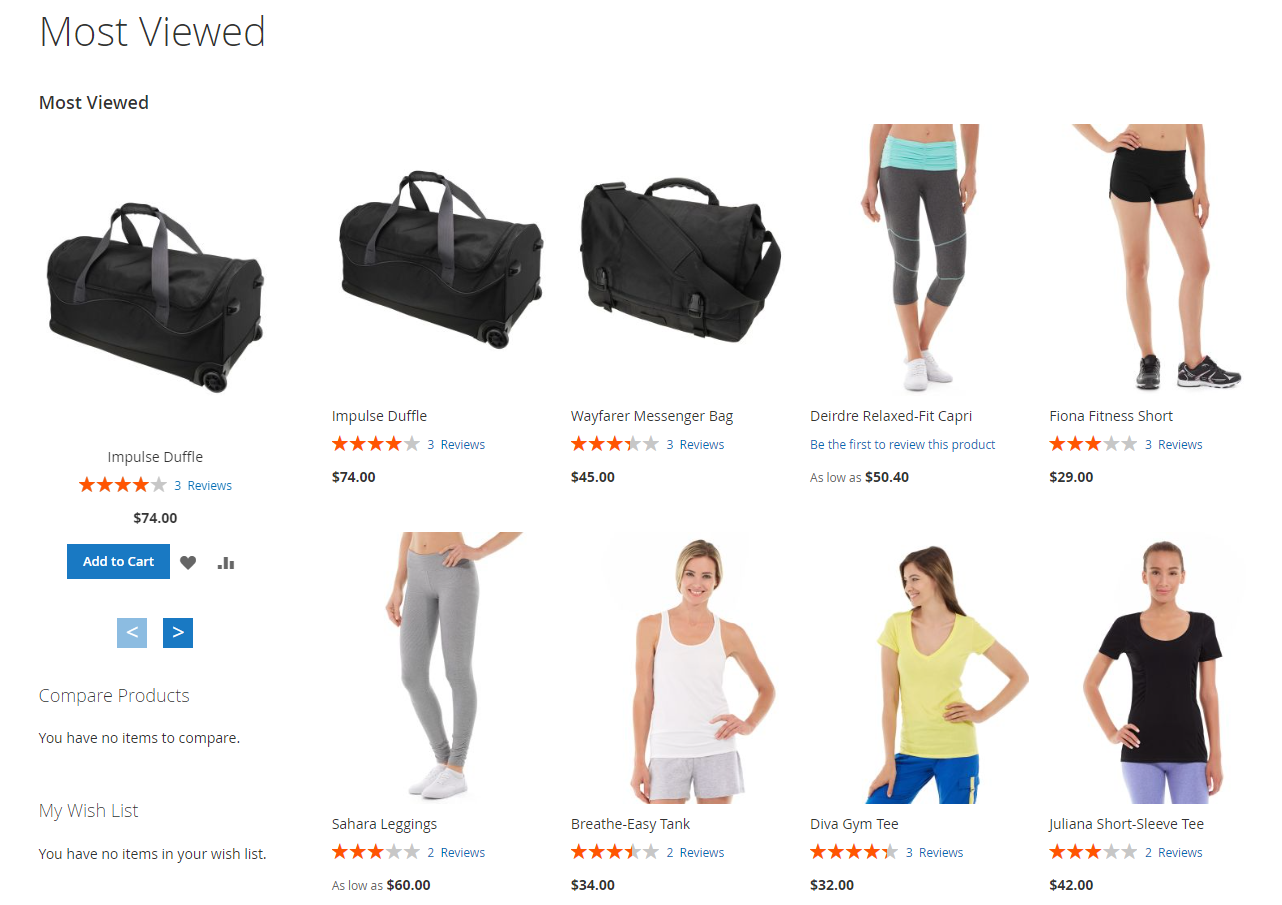
Most Viewed Products
Extension Installation
For Magento Marketplace Customers
-
Find the Composer name and version of the extension in the extension's composer.json file.
-
Login to your SSH and run:
- composer require mavenbird/magento2-most-viewed
- Wait for Composer to finish updating your project dependencies and make sure there aren't any errors.
-
To verify that the extension installed properly, run the command:
- php bin/magento module:status Mavenbird_MostViewed
- By default, the extension is probably disabled.
- Enable the extension and clear static view files:
- php bin/magento module:enable Mavenbird_MostViewed --clear-static-content
- php bin/magento setup:upgrade
- For Magento version 2.0.x to 2.1.x - php bin/magento setup:static-content:deploy
- For Magento version 2.2.x & above - php bin/magento setup:static-content:deploy --f
- php bin/magento cache:flush
For Mavenbird Customers
- Extract the zip folder and upload our extension to the root of your Magento 2 directory via FTP.
- Login to your SSH and run below commands step by step:
- php bin/magento setup:upgrade
- For Magento version 2.0.x to 2.1.x - php bin/magento setup:static-content:deploy
- For Magento version 2.2.x & above - php bin/magento setup:static-content:deploy --force
- php bin/magento cache:flush
Boost your Magento 2 store's performance with the Most Viewed Product Module. This extension enables you to highlight popular products, enhance customer engagement, and drive sales through strategic product visibility.
Features
- Automatically tracks and updates product views in real-time to ensure accurate popularity rankings.
- Showcase most viewed products on various pages such as homepage, category pages, or custom landing pages.
- Easily embed a customizable widget to display top products based on views in preferred store sections.
- Set time intervals (e.g., daily, weekly, monthly) for viewing statistics to adapt to changing trends.
- Gain insights into product performance with detailed analytics on view counts and trends.
- Ensures seamless display across all devices for optimized user experience.
- Integrate with promotional campaigns by highlighting popular products in marketing strategies.
- Enhance SEO efforts by featuring high-demand products prominently, improving organic search visibility.
- Define rules for displaying most viewed products based on categories, attributes, or customer segments.
- Configure module settings per store view or website to adapt to diverse market needs.
Configuration
Stores → Configuration → MAVENBIRD EXTENSIONS→ Most Viewed.
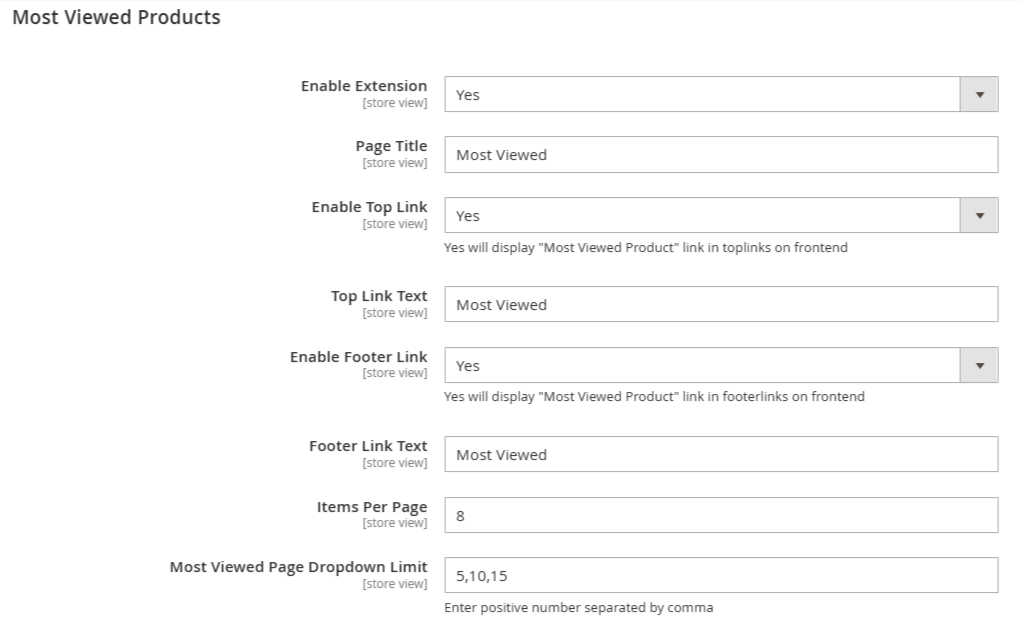
Enable Extension: Enables or disables the "Most Viewed Product Module."
Page Title: Sets the title for the most viewed products page.
Enable Top Link: Displays a link to the "Most Viewed Product" page in the top links on the frontend.
Top Link Text: Sets the text for the top link.
Enable Footer Link: Displays a link to the "Most Viewed Product" page in the footer links on the frontend.
Footer Link Text: Sets the text for the footer link.
Items Per Page: Sets the number of items displayed per page on the most viewed products page.
Most Viewed Page Dropdown Limit: Sets the options for the number of items displayed per page, shown as a dropdown.
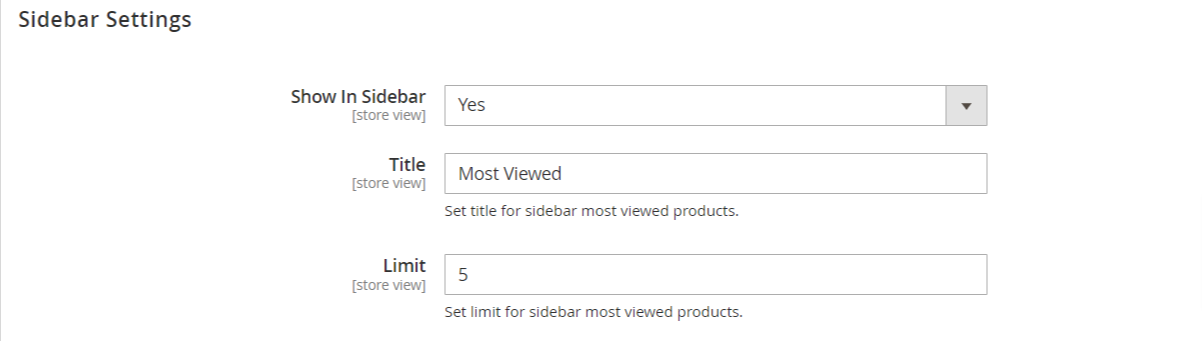
how In Sidebar: This option allows you to enable or disable the display of the sidebar in your store. Selecting "Yes" will make the sidebar visible to users.
Title: This field lets you set the title for the sidebar section that displays the most viewed products. In the image, the title is set to "Most Viewed," which informs customers about the popular items in your store.
Limit: This setting defines the maximum number of most viewed products to display in the sidebar. In the image, the limit is set to 5, meaning only the top five most viewed products will be shown.
Frontend View
The module allows you to display the most viewed products in various sections of your website, including the main page, top links, footer links, and sidebar. This flexibility ensures that your customers can easily find and explore popular products, driving more interaction and purchases.