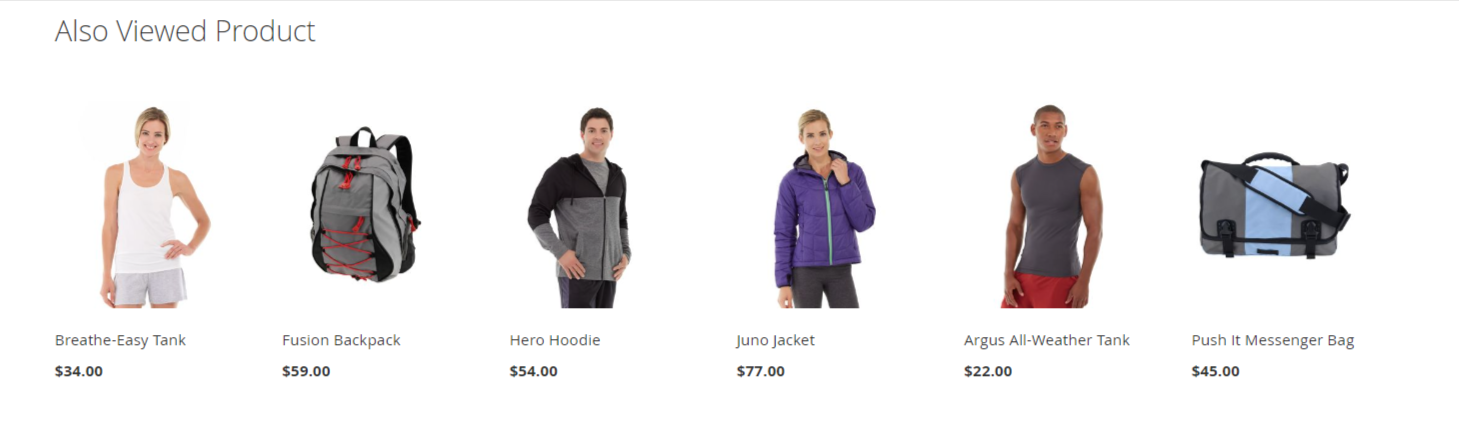
Also Viewed
Extension Installation
For Magento Marketplace Customers
-
Find the Composer name and version of the extension in the extension's composer.json file.
-
Login to your SSH and run:
- composer require mavenbird/alsoviewed
- Wait for Composer to finish updating your project dependencies and make sure there aren't any errors.
-
To verify that the extension installed properly, run the command:
- php bin/magento module:status Mavenbird_AlsoViewed
- By default, the extension is probably disabled.
- Enable the extension and clear static view files:
- php bin/magento module:enable Mavenbird_AlsoViewed --clear-static-content
- php bin/magento setup:upgrade
- For Magento version 2.0.x to 2.1.x - php bin/magento setup:static-content:deploy
- For Magento version 2.2.x & above - php bin/magento setup:static-content:deploy --f
- php bin/magento cache:flush
For Mavenbird Customers
- Extract the zip folder and upload our extension to the root of your Magento 2 directory via FTP.
- Login to your SSH and run below commands step by step:
- php bin/magento setup:upgrade
- For Magento version 2.0.x to 2.1.x - php bin/magento setup:static-content:deploy
- For Magento version 2.2.x & above - php bin/magento setup:static-content:deploy --force
- php bin/magento cache:flush
Enhance your Magento 2 store with the Also Viewed Product Module. This extension helps you increase customer engagement by displaying products that are frequently viewed together, encouraging additional purchases and improving the overall shopping experience.
- Automatically displays products that are often viewed together by customers.
- Showcase also viewed products on product pages.
- Easily embed a customizable widget to display also viewed products in preferred store sections.
- Choose to display products from the same category or across different categories for broader recommendations.
- Ensures seamless display across all devices for optimized user experience.
- Enhance promotional campaigns by highlighting also viewed products to increase cross-sell opportunities.
- Improve SEO by featuring relevant products, increasing page views and dwell time.
- Define rules for displaying also viewed products based on categories, attributes, or customer segments.
- Configure module settings per store view or website to adapt to diverse market needs.
Enhance your Magento 2 store with the Also Viewed Product Module. This extension helps you increase customer engagement by displaying products that are frequently viewed together, encouraging additional purchases and improving the overall shopping experience.
- Automatically displays products that are often viewed together by customers.
- Showcase also viewed products on product pages.
- Easily embed a customizable widget to display also viewed products in preferred store sections.
- Set the number of products to display based on your store's layout and design.
- Choose to display products from the same category or across different categories for broader recommendations.
- Ensures seamless display across all devices for optimized user experience.
- Enhance promotional campaigns by highlighting also viewed products to increase cross-sell opportunities.
- Improve SEO by featuring relevant products, increasing page views and dwell time.
- Define rules for displaying also viewed products based on categories, attributes, or customer segments.
- Configure module settings per store view or website to adapt to diverse market needs.
Configuration
First of all click on Store → Configuration→ MAVENBIRD EXTENSIONS. Then Check General Settings.
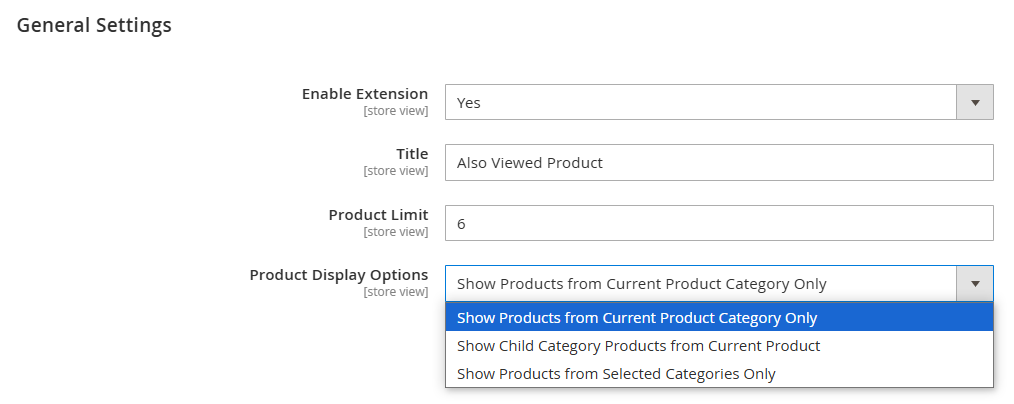
- Enable the module by setting "Enable" to "Yes."
- Enter the desired title for the module (e.g., "Most Viewed Products").
- Set the product limit for display (e.g., 6 products).
- In the "Product Display Options" dropdown, select one option.
Frontend View