

Did you know that, according to a survey by Forbes, 84% of online shoppers completed a purchase because the shipping was free?
Offering free shipping is one of the most effective tools to encourage customers to complete their purchases. However, it’s important to approach it carefully, as it can impact your profit margins if not managed properly.
In this article, you’ll discover the benefits of free shipping and how to set it up on your Shopify store. You’ll also learn strategies to optimize free shipping for the best results.
5 Benefits of Offering Free Shipping on Shopify
Here are the top 5 benefits of offering free shipping on your Shopify store.
1. Increased Conversions
Customers are more likely to complete their purchase when free shipping is offered, which can lead to an increase in your conversion rate.
2. Lower Cart Abandonment
When you offer free shipping, customers are less likely to abandon their carts since there are no surprise fees at checkout.
3. Increased Sales
Offering free shipping encourages customers to buy more items than they originally planned, leading to higher sales.
4. Higher Customer Satisfaction
Free shipping enhances customer satisfaction, as shoppers feel they're getting a better overall deal.
5. Gaining a Competitive Edge
Providing free shipping can give you an edge over competitors who charge for shipping, helping you stand out in the market.
Types of Free Shipping
There are three types of free shipping on Shopify:
- Free shipping for all products
- Free shipping over a certain cart value
- Free shipping for specific products
Type 1: Free Shipping for All Products
To set up free shipping for all products on your Shopify store, follow these steps:
- Log into your Shopify dashboard.
- Navigate to “Settings” and click on “Shipping and Delivery”.
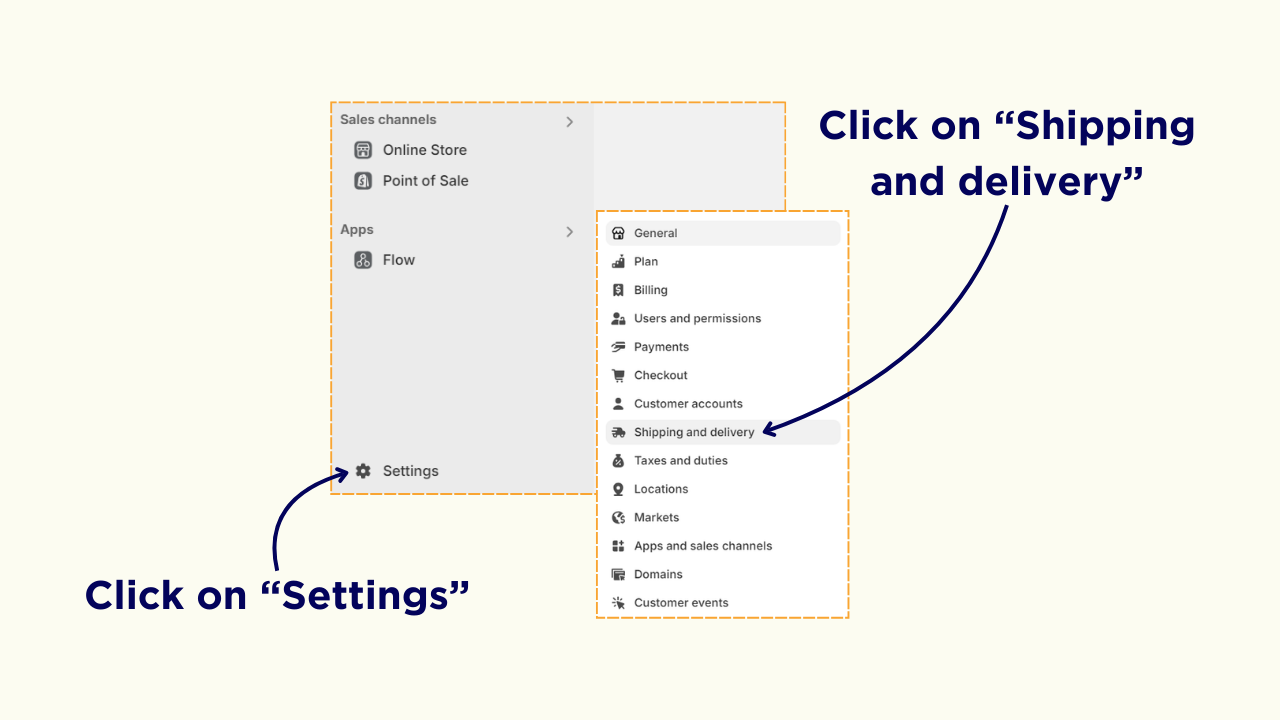
- Under “General Shipping Rates”, click on “General” and then click on “Create Zone” under the shipping zone section.
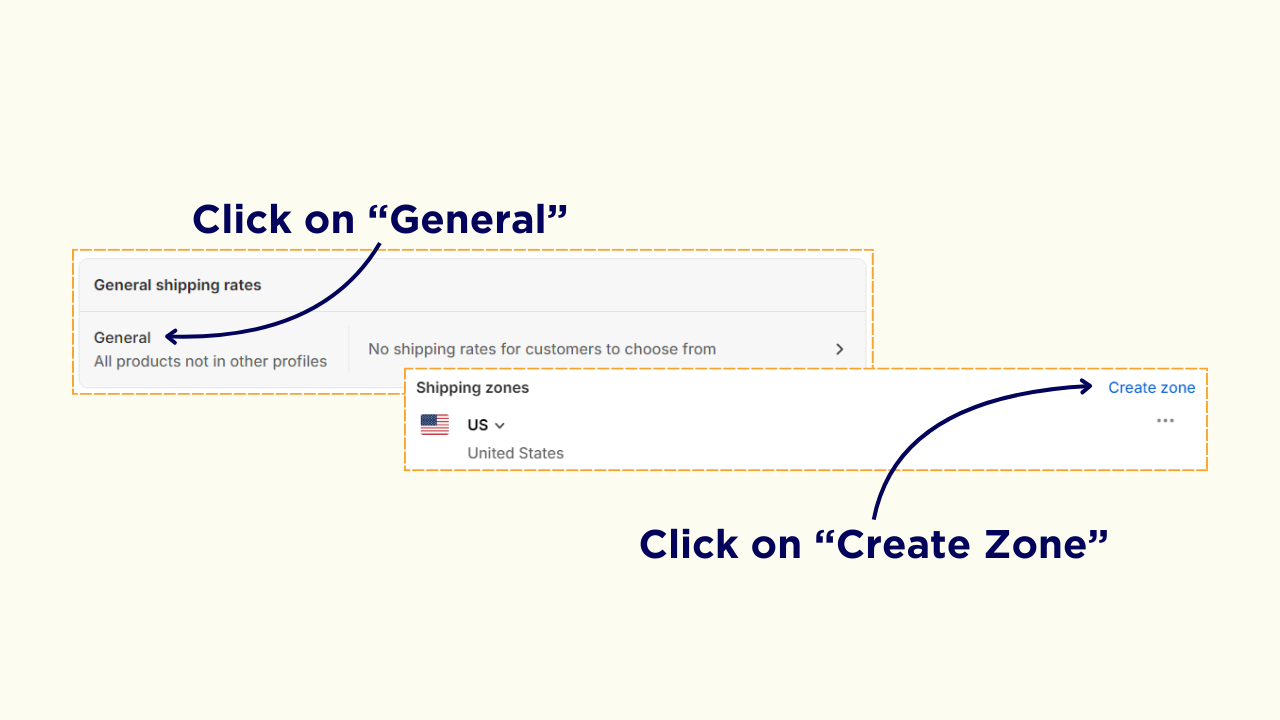
- Enter a zone name, select the countries and regions and click “Done” to create a zone.
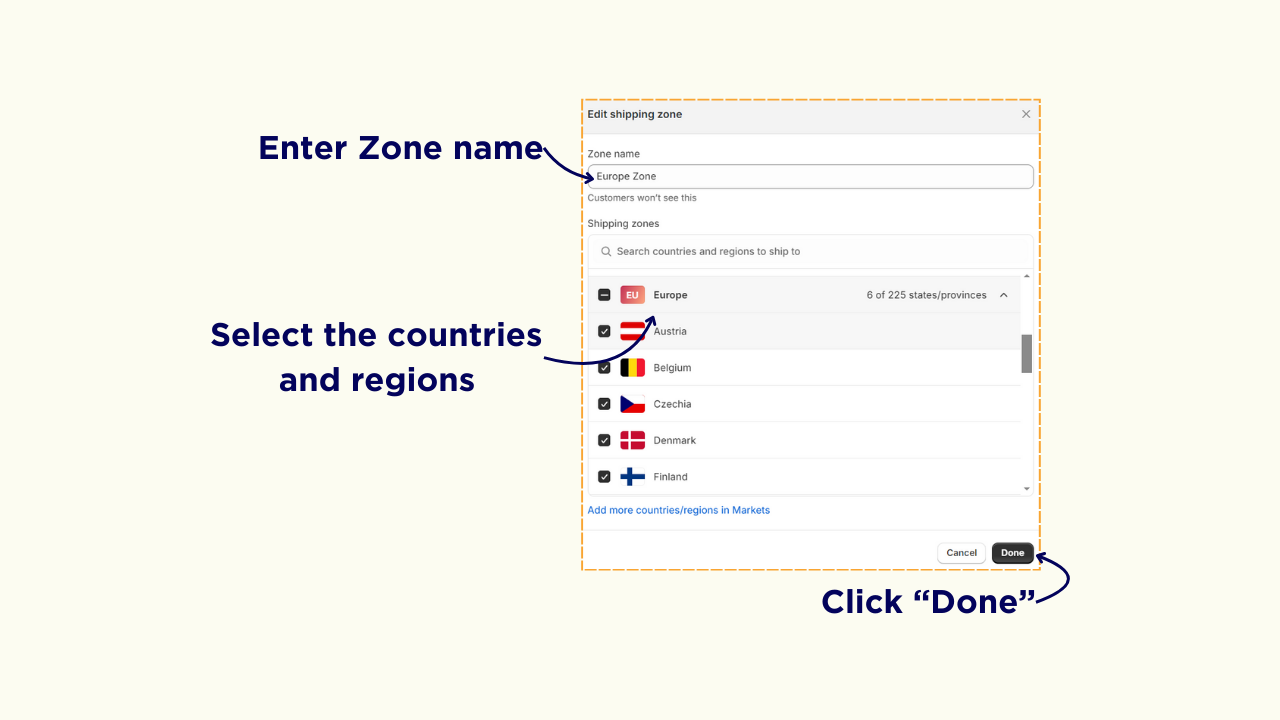
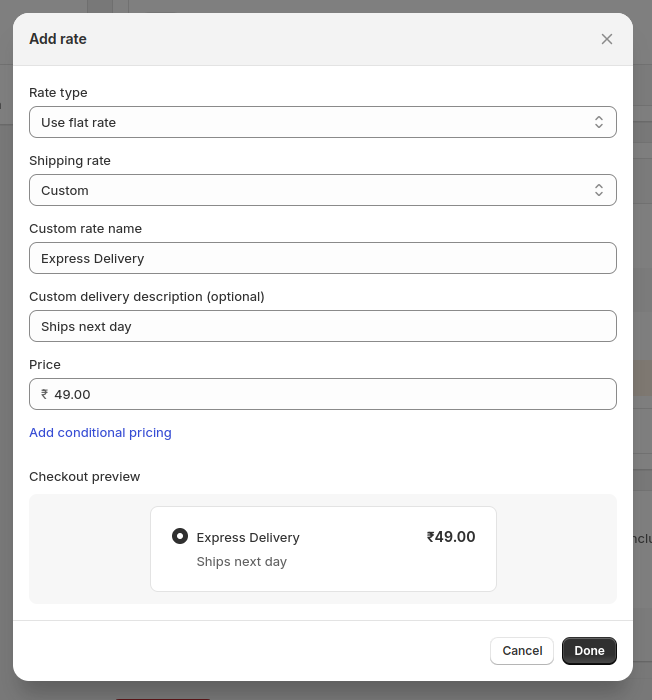
- Click “Add Rate”, select “Use Flat Rate” under Rate Type, ensure the price is set to $0.00 and click “Done”.
Type 2: Free Shipping Over a Certain Cart Value
Follow these steps to set up free shipping for all products in your Shopify store:
- Go to “Settings” and select the “Shipping and Delivery” option.
- Under “General Shipping Rates,” click on “General” and then click “Create Zone” under the shipping zone section.
- Click “Add Rate” under the zone you want, and select the “Use Flat Rate” option.
- Choose your desired shipping rate option and enter the shipping price.
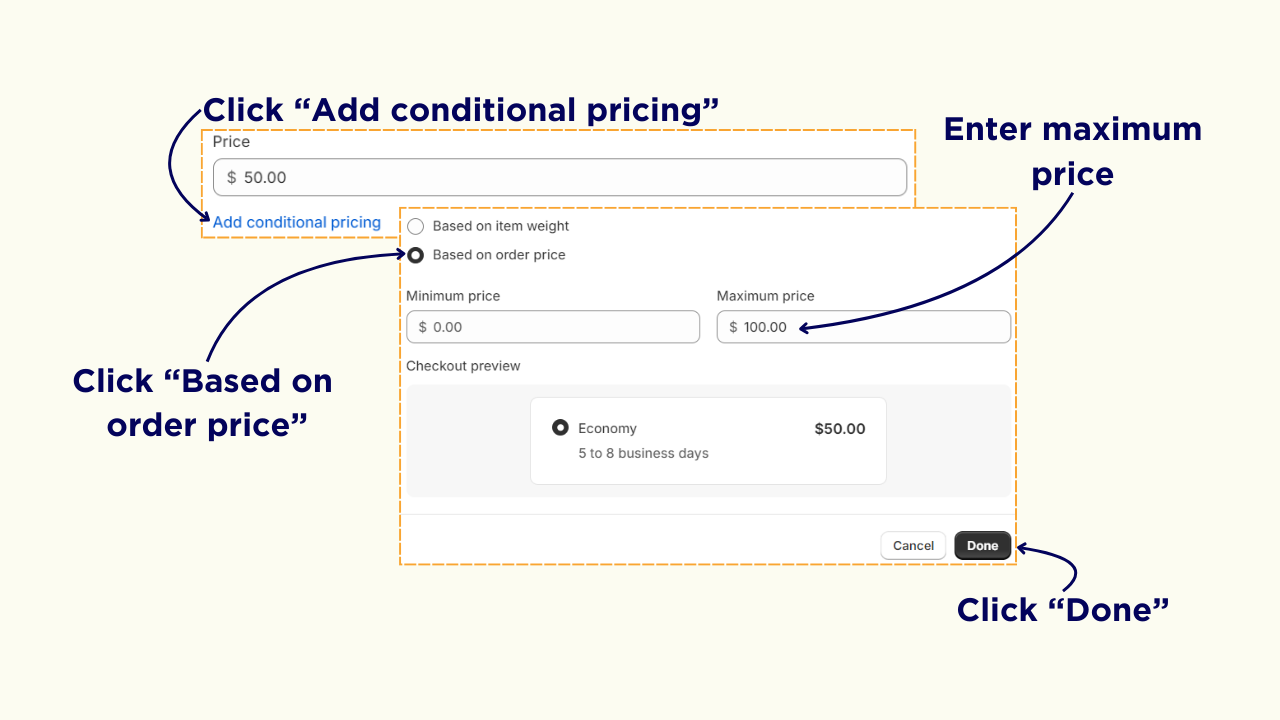
- Click “Add conditional pricing” and select the “Based on order price” option.
- Enter the price threshold for free shipping. For example, if you want to offer free shipping for orders over $100, enter "$100" under the Maximum price and click “Done.”
- Click “Add Rate” again, select “Use flat rate”, set price as $0.00, and click “Add Conditional pricing”.
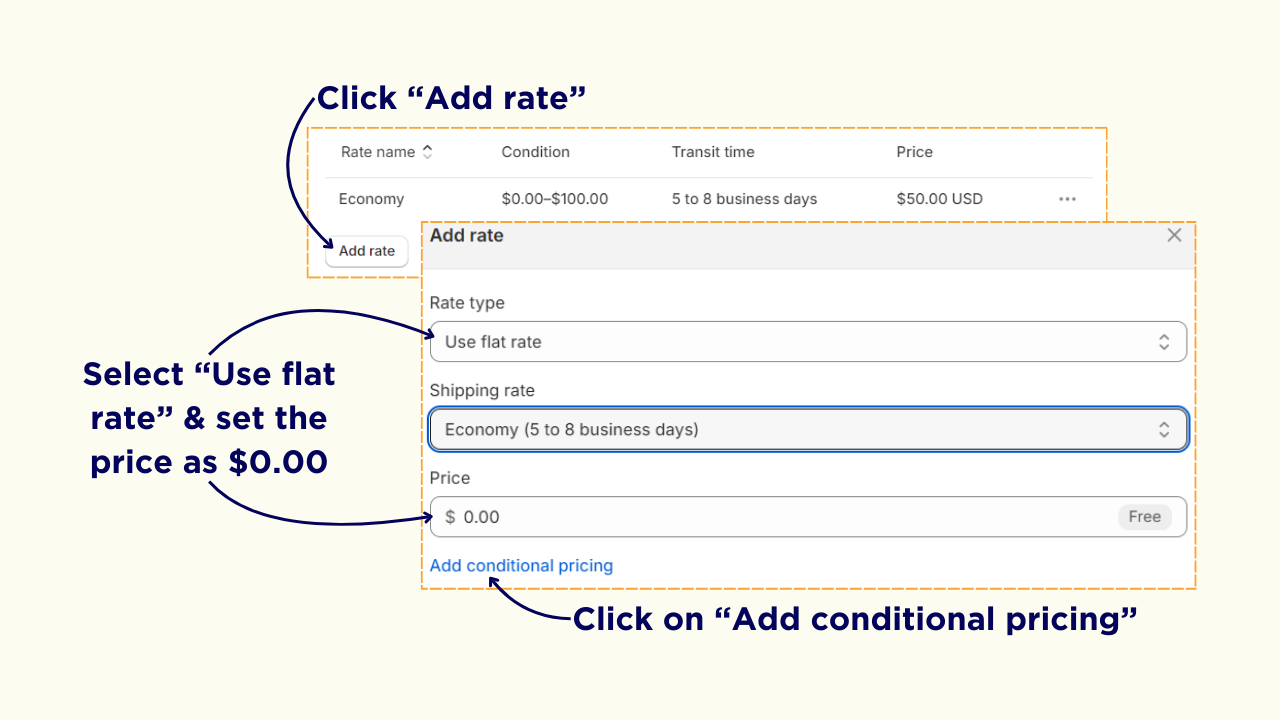
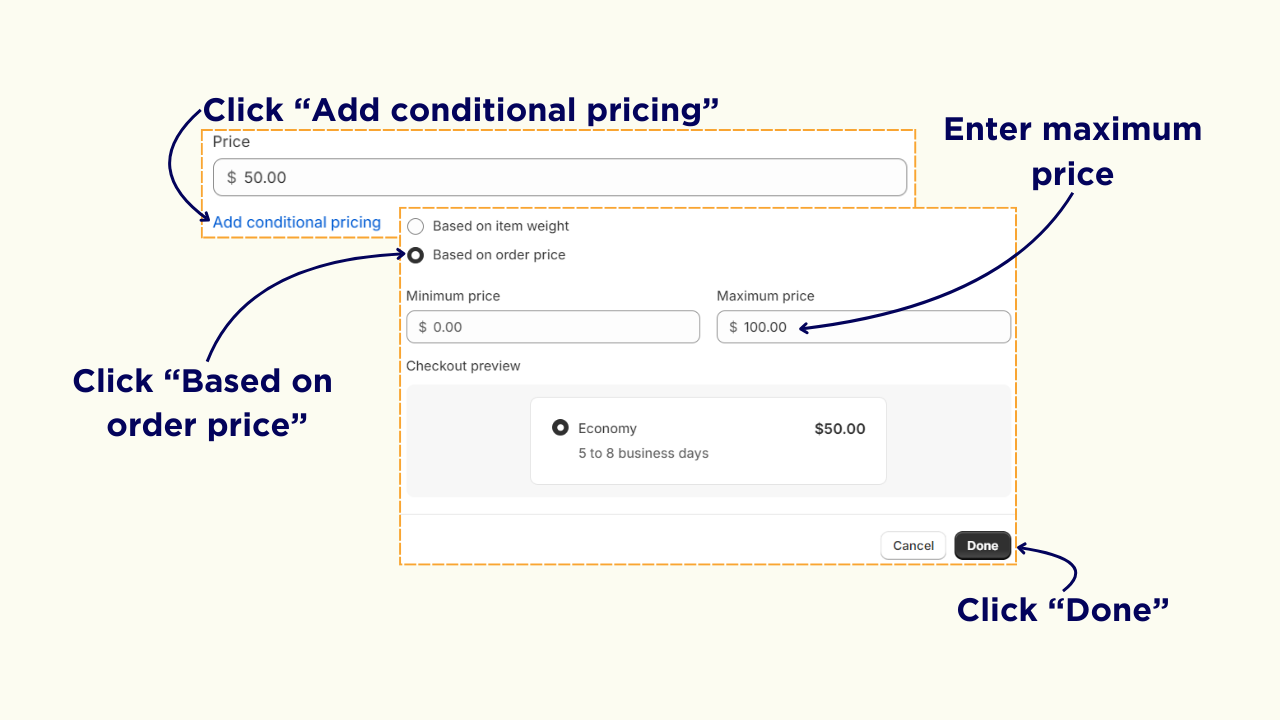
- Select “Based on order price”, enter the Minimum price as $101 and click “Done”.
Type 3: Free Shipping for Specific Products
This type of free shipping allows you to set different shipping rates or free shipping based on specific products. Follow these steps to set up free shipping for specific products on your Shopify store:
- Go to “Settings” and select “Shipping and Delivery”.
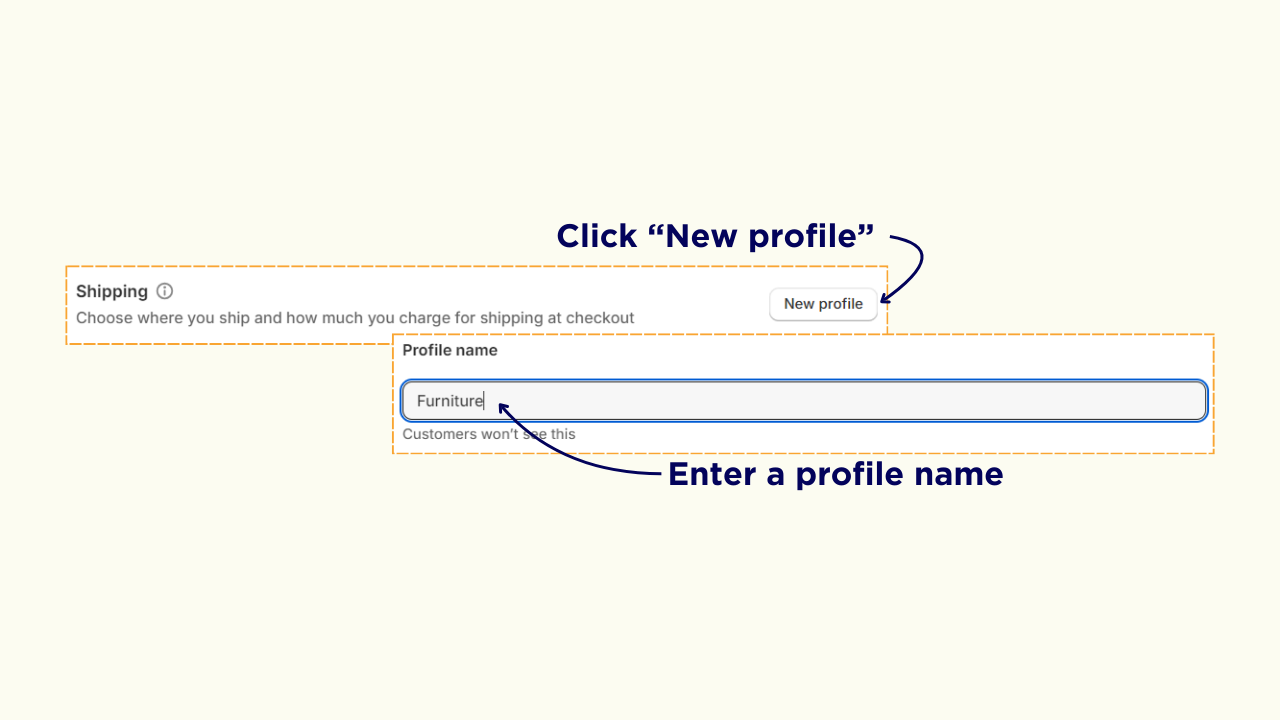
- Click on “New Profile” and enter a profile name.
- Under the Products section, click on “Add products”, add the products to which you want to offer free shipping and click “Done”.
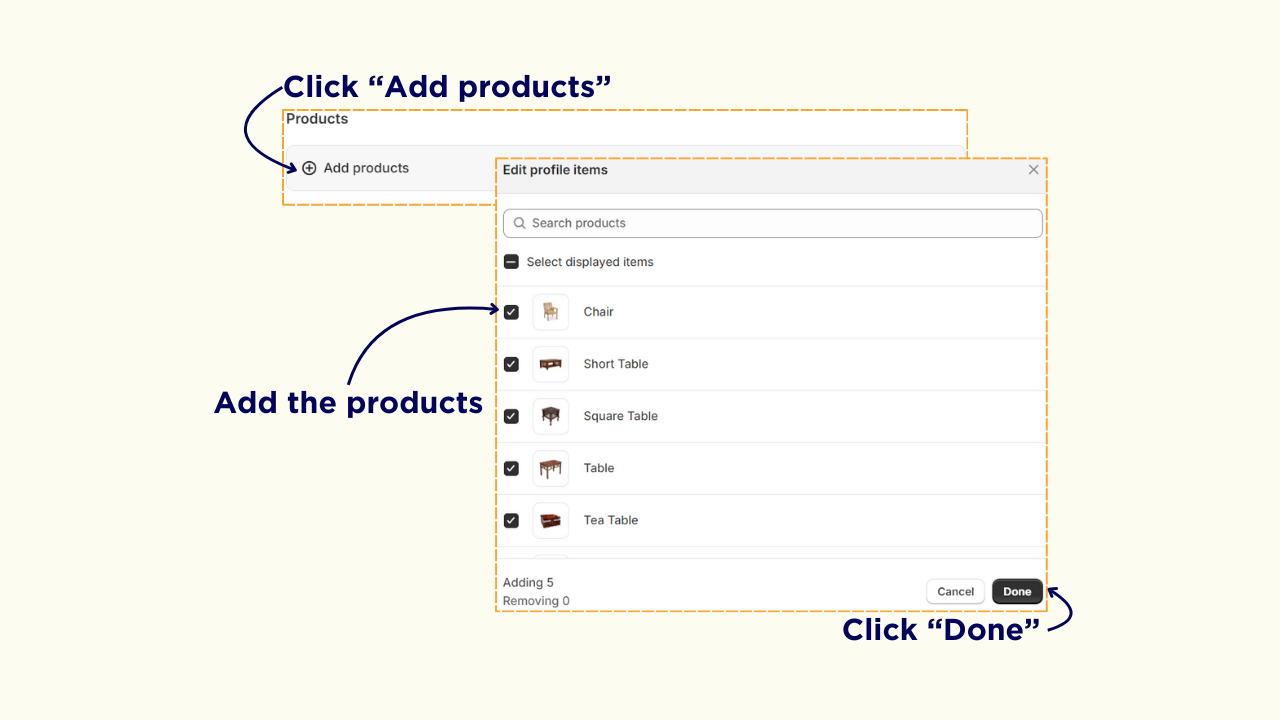
Follow these steps to set up free shipping for specific products on your Shopify store:
- Scroll down to the “Shipping Zones” section, click on “Create Zone”, add the countries, and click “Done”.
- Click on “Add Rate”, select “Use Flat Rate” as the rate type, enter a name for the rate, and provide an optional description.
- Ensure the price is set to $0.00 for free shipping and click “Done”.
Inform Your Customers About Free Shipping
Once you set free shipping, it is necessary to inform your customers that you offer free shipping to your store. Here are two different ways to announce free shipping.
1. Custom liquid codes
You can use the liquid and CSS code below to set a free shipping banner on your Shopify store.
Liquid Code
CSS Code:
.free-shipping-banner {
  width: 100%;
  height: 60px;
  display: flex;
  align-items: center;
  justify-content: center;
  background: #121212;
  color: #fff;
  font-weight: 500;
  font-size: 18px;}
2. Free shipping bar app
You can install a free shipping bar app from the Shopify app store to inform your customers about free shipping using a banner or progress bar.
If you're planning to offer free shipping on your Shopify store, here are nine effective strategies to help you make it work without sacrificing your profits:
- Limit free shipping to select products: Offer free shipping on smaller, lighter items that are easier to ship. This way, you can avoid high shipping costs on larger products.
- Set a minimum order threshold: Use free shipping as an incentive to encourage customers to buy more. Set a minimum order value that must be met to qualify for free shipping, boosting both your sales and average order value.
- Increase product prices slightly: You can subtly cover shipping costs by slightly raising the prices of your products. This allows you to offer free shipping without cutting into your margins.
- Offer limited-time free shipping: Create urgency with limited-time offers for free shipping. This strategy motivates customers to finalize their purchase quickly, driving up sales.
- Factor in profit margins: Calculate your profit margins carefully to understand how much you can afford to spend on shipping when offering free shipping, ensuring it doesn't hurt your bottom line.
- Restrict free shipping to certain locations: Limit free shipping to specific geographic regions to keep shipping costs manageable and reduce unnecessary expenses.
- Offer free shipping through loyalty programs: Use free shipping as a reward for customers who join your loyalty program, encouraging sign-ups and repeat purchases.
- Negotiate with shipping carriers: Partner with shipping carriers to secure discounted rates, reducing your overall shipping costs when offering free shipping.
- Offer free local delivery or pickup: If you have a physical store, consider providing free local delivery or curbside pickup as an alternative to traditional shipping.
Wrapping Up
In conclusion, offering free shipping can be a profitable strategy if implemented correctly on your Shopify store. By following the steps and strategies outlined in this article, you can:
- Boost sales
- Increase conversion rates
- Reduce cart abandonment
- Improve customer satisfaction
Whether you choose to offer free shipping on all products or for orders over a specific cart value, be sure to communicate this benefit to your customers.
If the default Shopify shipping settings aren't sufficient for your needs, consider installing the Shipping Rates Shipeasy app from the Shopify App Store. Shipeasy allows you to set custom shipping rates based on advanced rules and over 30 different parameters.






