


Your decision to migrate to Shopify is undoubtedly triggered by a list of factors. Maybe your current eCommerce platform is lacking growth options, you’re seeking advanced features, or looking to change your design goals.
Whatever reasons you have, the main question that is stuck in your mind is, “What will be the cost of migration?” This blog will surely answer that.
To ensure a successful transition to Shopify, you really should have your base clear. So, we’ll start by discussing some basic doubts that you may have at this point. If you’re curious to uncover costs associated with Shopify migration, you can check the table of contents and jump right there.
And here, we’ll start with the basics.
What is Shopify?

Shopify is an all-in-one eCommerce platform with a highly user-friendly interface, the best tools, features, robust scalability options, and more that no other platform can match.
This is an easy-to-use platform, where you can create your store independently, tweak website design using its drag-and-drop functionality, and much more — without requiring technical knowledge. Moreover, Shopify has a wide range of built-in tools that allow businesses to manage inventory, process payments, and track sales effectively.
If you’re skeptical about whether Shopify is the right choice for you, I assure you that your decision to migrate to Shopify is well worth your excitement.
What are the benefits you get while migrating to Shopify? Let’s discuss them.
Why You Should Migrate to Shopify?
There is a multitude of eCommerce platforms to choose from, and each of them has unique offerings. However, I see no doubt in stating that Shopify is the best among them. This is evident, as over 4 million businesses worldwide rely on Shopify for online sales.
These businesses chose Shopify because of its flexibility and reliability. If you’re thinking of migrating your eCommerce store, Shopify deserves to top your priority list of platforms. Let me list some reasons to prove it.
1. Shopify is Cost-effective
Cost is a primary consideration for anyone making a purchase, and online store owners like you are no exception. Shopify stands out for its affordability, offering subscription packages designed for creating your store.
When using platforms other than Shopify, you have to factor in expenses such as server costs, hosting fees, security, payment processing, and more. In contrast, Shopify provides a comprehensive cloud-hosted service that allows you to seamlessly set up your eCommerce store, starting at just $29 per month.
2. Shopify is Easy to Set Up and Customize
Shopify is designed with user-friendliness in mind. Even if you lack prior experience with eCommerce platforms or coding languages like HTML or CSS, you can easily set up your Shopify site without needing expert assistance.
In addition to a smooth setup process, Shopify offers a variety of templates that can be tailored to fit your brand. Its drag-and-drop builder is a major advantage, simplifying the customization experience. Furthermore, the Shopify app store provides extensive options for further customization.
3. Shopify has Scalability Options
We don’t endorse Shopify without reason; it caters to businesses of all sizes. Whether you are experiencing growth challenges with your current platform or aiming for advanced customization, Shopify provides the stability you need as your business grows.
There’s no additional effort required—simply subscribe to the appropriate plan, be it an Advanced Shopify Plan or a Shopify Plus Plan.
4. Shopify is Secure and Reliable
As previously mentioned, Shopify hosts your store on its servers, ensuring both the security of your store and your peace of mind. Unlike self-hosted platforms like WordPress and Magento, you won't have to worry about maintaining server security; Shopify takes care of it.
The platform continuously updates its security systems to follow best practices, and all you need to do is stay informed about Shopify updates to ensure ongoing security.
- The Shopify Community provides immense value, offering support to store owners facing challenges.
- Shopify Plus is a recent addition aimed at enterprise-level businesses.
- Besides subscription fees, Shopify has minimal hidden costs.
- Shopify is highly SEO-friendly and boasts impressive performance capabilities.
- Personalization is straightforward with Shopify.
- The product management system in Shopify simplifies inventory management for merchants.
These are some key reasons why Shopify is the right choice for you. Now, you might be feeling anxious about the migration process, fearing it will be lengthy and complicated. However, rest assured that migrating to Shopify professionally will simplify the process and make it worry-free.
Let’s now delve into how long the migration takes.
How Long Does it Take to Migrate to Shopify?
The simplest answer is that the larger your store, the longer the migration process will take.
You might be wondering why that is. Allow me to explain.
The Shopify migration process involves exporting and importing store data from your current platform to Shopify. Ultimately, the duration will depend on the volume of data your store holds, which includes the number of products, customer information, order histories, and the complexity of any customizations.
- If your store is small to medium-sized with minimal data and functionality, the Shopify migration process may take approximately 5-7 days.
- If your store falls into the medium to enterprise size category, containing a substantial amount of data and functionality, the migration could take around 4-6 weeks.
Given that there are many moving parts in the process, which can be quite complex, I recommend hiring a Shopify expert to assist with your store migration. Their expertise can make a significant difference in ensuring a smooth transition.
The Migration Process
Here is the migration process we follow, which consists of five steps:
- Step 1: Data Backup
- Step 2: Data Export
- Step 3: Data Import
- Step 4: Customization
- Step 5: Testing and Launch
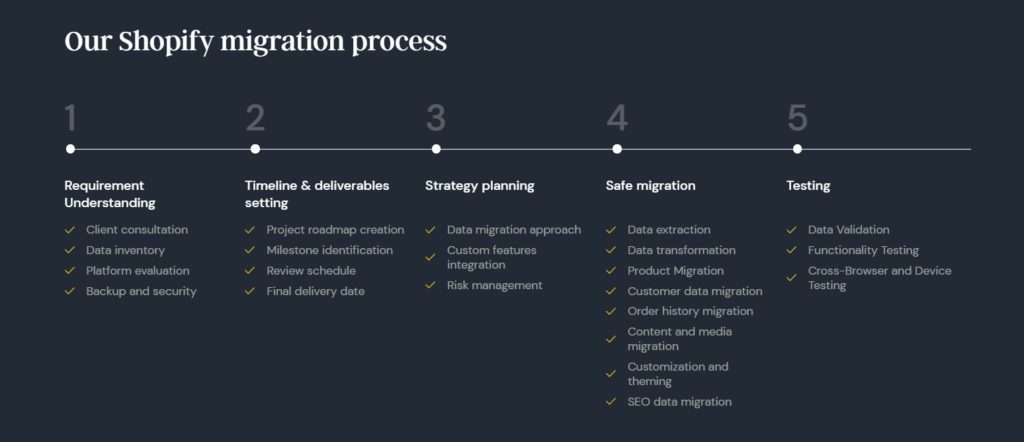
By following this process, we ensure a smooth migration to Shopify within 14 days.
Now that we've established how long the migration will take, let’s address the primary question on your mind — the cost of Shopify migration.
How Much Does it Cost to Migrate to Shopify?
There is No Fixed Amount when you migrate your website to the Shopify platform.
Instead, there’s a range of costs associated with Shopify migration, and here’s a list:
- Shopify Subscription Fees
- Store Migration Cost
- Shopify Store Set Up and Redesign Cost
- Domain Name Fees
In this section, we’ll provide an in-depth breakdown of each of these costs that come into play during the migration process.
1. Shopify Subscription Fees
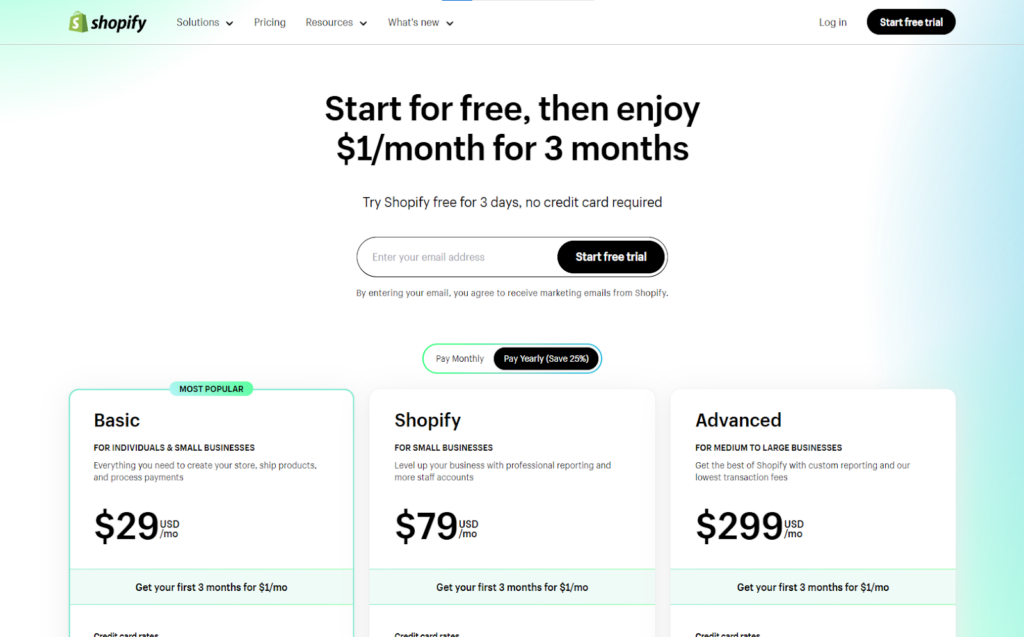
As mentioned earlier, Shopify operates on monthly subscription packages, making it the first cost to consider when you move to Shopify. If you ask which subscription plan will be the right choice for you, the answer is – it will depend on your business size and the functionalities required.
Here I’m adding a table that includes pricing plans of Shopify and specifies the business sizes for which they work best.
| List of Plans Provided | Plan Pricing | Best for |
| Basic Shopify Plan | $29 per month | Individuals and small businesses |
| Shopify Plan | $79 per month | Small businesses |
| Advanced Shopify Plan | $299 per month | Medium to large sized businesses |
| Shopify Plus | $2000 per month | Enterprise sized businesses |
You can compare the pricing models of Shopify plans to select one that aligns with your store size and budget. Now, let’s explore another cost associated with transitioning to Shopify.
2. Store Migration Cost

Once you've secured your subscription on Shopify, the next cost you'll encounter is related to data migration. You'll need to transfer all your data to Shopify, and unless your store has a very minimal amount of data, it's advisable to hire a Shopify developer to assist with the process.
Cost of Hiring a Shopify Expert for Migration:
- Fixed Rate: $10,000 to $20,000
- Hourly Rate: Approximately $20 to $55 per hour
If your store is small and has limited data, you may choose to handle the migration yourself. The Shopify app store offers a variety of free and paid migration apps, so consider the associated costs.
It's important to note that these figures can vary based on several factors, including your niche, store complexity, store size, duration of the migration process, and the experience level of the Shopify developers you hire. You have the flexibility to choose options that best fit your requirements and budget.
Keep in mind that the migration process doesn't end with the transfer of store data. It also includes migrating store functionalities, which requires setting up and redesigning your entire store on Shopify. This will incur additional expenses, so let’s explore those costs next.
3. Shopify Store Set Up and Redesign Cost

To kickstart your Shopify journey, the first thing you'll need is a theme. For added functionalities, a variety of Shopify Apps are available within its ecosystem.
Breakdown of Costs for Setting Up Your Store:
Average Cost of Shopify Themes:
Shopify provides free themes for its users. However, if you're looking for something more unique, premium themes are available, typically ranging from $180 to $350.
Average Cost of Shopify Apps:
The Shopify App Store features over 6,000 apps to enhance user experience, which includes both free and premium options. On average, premium apps cost around $20 per month.
Cost to Set Up or Redesign Your Shopify Website:
It's likely that you'll need a Shopify expert to assist in setting up your store, especially if you require high-quality customization and seamless integration of themes and apps. The cost for these services can range from $500 to $25,000, depending on the level of customization required and the developer's expertise.
Now, let's discuss the final cost you may encounter if you're considering giving your business a fresh start.
4. Domain Name Fees
If you're aiming to give your business a completely new identity after migration, you'll need to consider the cost of purchasing a domain name. This involves leaving behind your old domain and acquiring a new one. For example, if your store's previous name was slurpfinds.net and you decide to switch to slurpfinds.com, you'll incur this cost.
The cost of acquiring a new domain name typically ranges from $10 to $20 per year. However, this price may vary based on factors such as the registrar you choose, the length of the registration period, and any additional features you opt for.
That covers the essential costs involved in migrating to Shopify. I hope you now have a clearer understanding of each associated expense.
With the main question addressed — "How Much Does Migration Cost?" — we can move on to other relevant topics to alleviate any lingering doubts or questions. We'll begin by discussing key areas to focus on during and after migration to ensure a smooth transition to Shopify. Following that, we'll explore strategies for reducing your migration costs.
Things to Consider When Migrating to Shopify
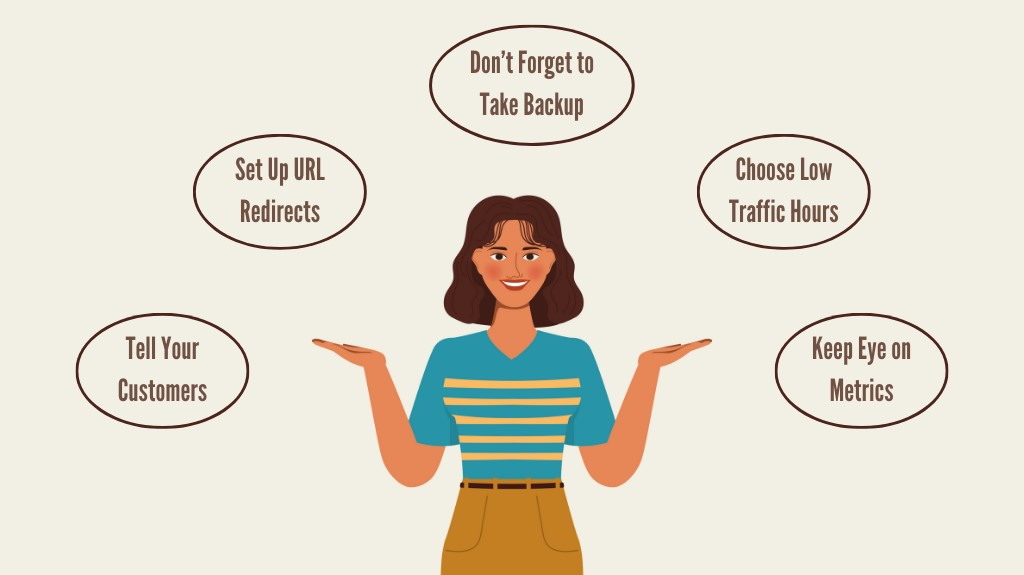
Transitioning to Shopify involves multiple phases, each requiring careful attention and precision. A single mistake can significantly impact your store operations, potentially leading to issues such as downtime, disruptions in the checkout process, decreased website performance, or loss of critical store data. To prevent these problems, focus on the following key aspects.
1. Begin with a Store Backup
The migration process carries inherent risks, making it essential to start by creating a complete backup of your store's data. This precaution ensures that, regardless of any unexpected challenges during migration, your store remains protected, allowing you to proceed with confidence.
2. Communicate with Your Customers
In the event of unforeseen performance issues during migration, customer frustration can escalate, increasing the likelihood of losing them permanently. To mitigate this, it's crucial to inform your audience in advance. By sending out notifications, you can manage customer expectations, letting them know about the upcoming changes and the potential for errors. Consider notifying them via email or displaying a prominent banner on your homepage to ensure transparency about the migration.
3. Migrate During Off-Peak Hours
Given the potential for downtime and performance issues during migration, it's advisable to execute the process during low-traffic periods. This strategy minimizes the impact on visitors and helps maintain a positive user experience. Additionally, migrating during these hours can assist Google in crawling your site more efficiently, as server load and resource demand will be significantly lower, facilitating better access and indexing of your pages.
4. Safeguard Your SEO
If SEO elements are not properly migrated, your store may experience a significant drop in search engine rankings. To avoid this, conduct a thorough audit after migration to verify that all essential on-page SEO elements—such as URLs, meta tags, and header tags—are preserved. This proactive approach will allow you to swiftly address any issues and maintain your hard-earned search rankings.
5. Implement Redirects
When moving your store to Shopify, changes to URLs, page structures, and the overall website layout are common. To prevent 404 errors, it's vital to set up redirects from your old URLs to their new counterparts. Failing to do so could result in dead links, which not only frustrates users but can also harm your search engine rankings. Setting up redirects in Shopify is straightforward; simply navigate to Sales Channel > Online Store > Navigation, where you'll find the option to view and manage URL redirects.
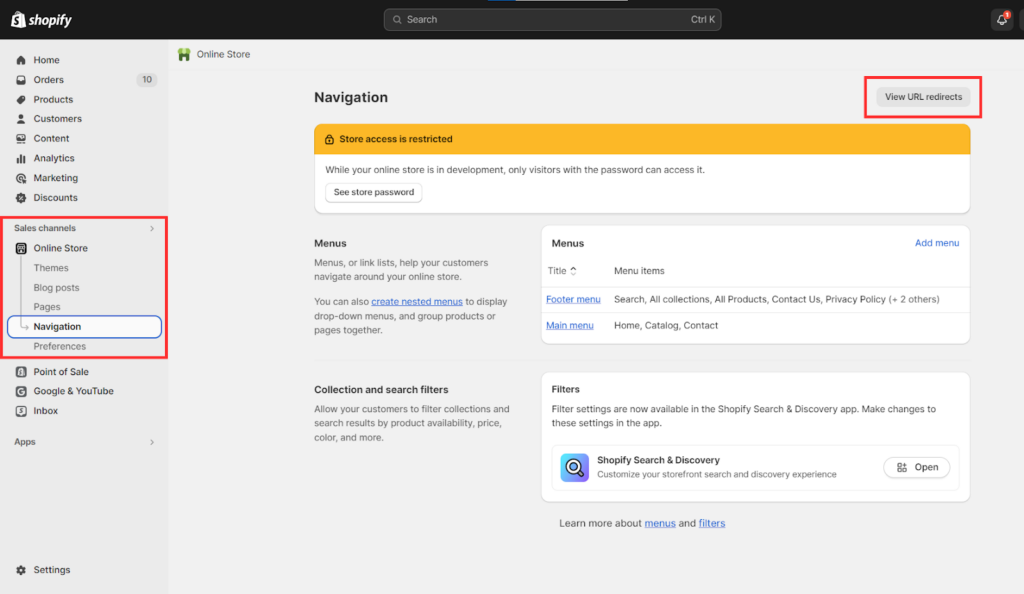
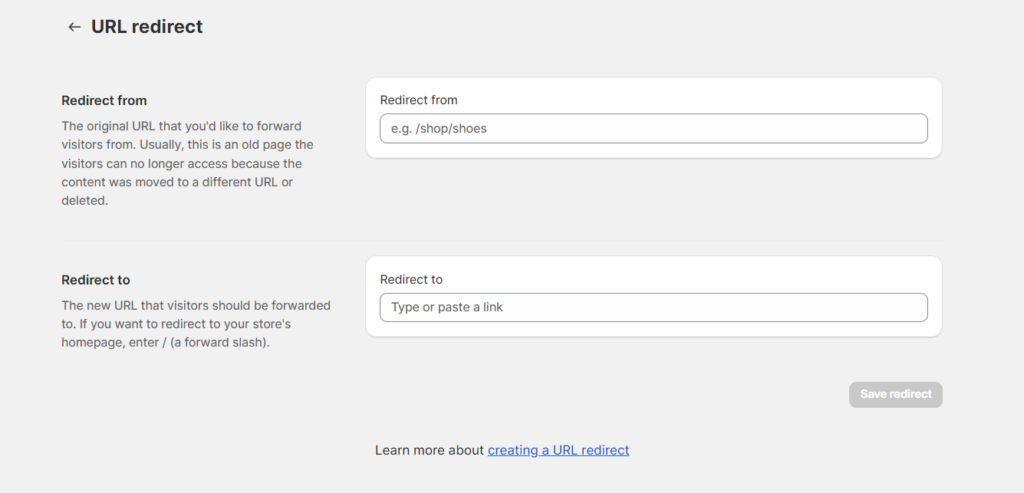
It will provide you with an option to easily import your entire Excel sheet of URLs that you wish to redirect to a new one. Or you can manually add them.
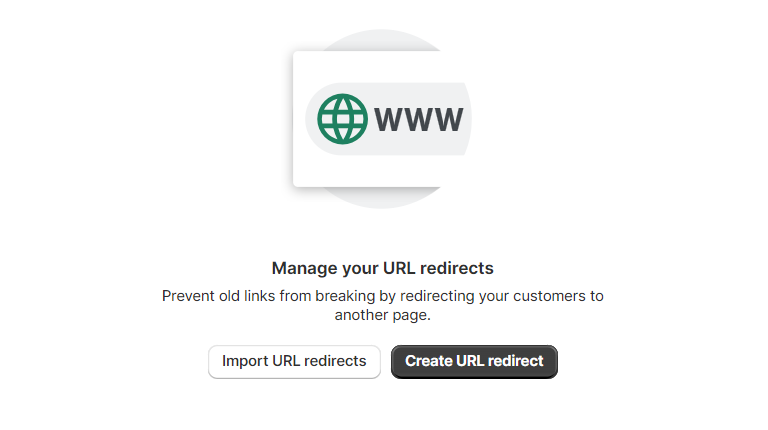
The image that I added below shows how easy it is going to be.
6. Compare Metrics and Analytics Post-Migration
To evaluate whether the migration has successfully enhanced your performance and user experience, or at least ensured no negative impact, it’s essential to review your metrics and analytics after the migration is complete.
Focus on tracking key metrics such as website traffic, conversion rates, and user engagement. Tools like Google Analytics and Google Search Console will provide valuable insights into the success of your migration and indicate if any modifications are necessary.
While you can manage these areas independently, some complexities may arise during your transition to Shopify. Therefore, I recommend enlisting the help of Shopify experts for your store migration. They are well-versed in potential challenges that may occur during the process and can offer effective solutions.
Having professionals by your side serves as a safety net throughout this journey. If budget constraints are a concern when hiring Shopify experts for migration, there’s no need to worry. Our next section will discuss how you can hire experts on a budget to minimize your website migration costs.
How to Hire Shopify Migration Experts within the Budget?
One effective way to stay within your budget is by hiring Shopify experts based in Asia. In the eCommerce industry, it’s widely recognized that hiring talent from Asian countries typically incurs lower costs compared to hiring professionals from North America or Western Europe.
To assist you in comparing the costs associated with hiring from different regions, I’ve included a table below that outlines the average hourly rates of Shopify experts globally.
| Region | Average Hourly Rate |
| North America | $50 – $100+ |
| South America | $20 – $40 |
| Australia | $40 – $85 |
| Western Europe | $40 – $90 |
| Eastern Europe | $20 – $50 |
| Asia | $15 – $40 |
Hiring Shopify experts from Asia can be significantly more cost-effective compared to other regions. This advantage stems from the lower cost of living in Asian countries, coupled with favorable currency exchange rates, which can enhance your overall cost savings.
If you have concerns about the quality of work, rest assured that countries like India, the Philippines, Japan, and Vietnam boast a pool of highly skilled Shopify experts ready to assist you with your store migration seamlessly.
For more details, you can refer to How much does it cost to hire a Shopify expert?
Now, to simplify your hiring process further, let me introduce you to one of the best expert solutions that fits perfectly within your budget.
Aureate Labs is Cost-effective for Shopify Migration!
At Aureate Labs, we are an Asia-based eCommerce development agency with over 10 years of expertise in Shopify development.
What sets us apart in store migration is not only our competitive pricing but also our unwavering commitment to delivering high-quality work. We understand the challenges associated with the migration process and offer a seamless transition to your new Shopify store within two weeks, all while ensuring the preservation of your data, SEO, and overall online presence.
For more information, you can visit our Shopify Migration Services page, or contact our Shopify experts right away.






