

Authentication and information security during direct sales are essential, which is why the Shopify POS PIN (Personal Identification Number) is so important. However, many new users, and even experienced staff, may find it challenging to locate and manage this PIN.
In this article, we will help you learn more about the Shopify POS PIN, how to find it, and the security measures you can implement to ensure smooth and safe store operations.
Understanding Shopify POS PIN
Shopify POS PIN (Point of Sale Personal Identification Number) is a crucial security feature designed to protect transactions and access within the Shopify POS system. This PIN serves as a secure authentication method for employees or users operating Shopify’s POS hardware or software.
Key Points to Understand:
- Security Authentication: The Shopify POS PIN is essential for verifying user access to the Shopify POS system. Each user is assigned a unique PIN to log into the POS interface.
- Transaction Security: The PIN ensures that only authorized personnel can initiate and complete sales, preventing fraudulent transactions and unauthorized access.
- User Management: Shopify administrators can create, reset, and deactivate POS PINs for employees through the Shopify admin dashboard, managing access effectively.
- Convenient Access: While serving a security function, the Shopify POS PIN system is designed for ease of use, allowing employees to log in quickly without complicated processes.
- Compliance and Best Practices: Implementing the Shopify POS PIN aligns with retail security best practices, ensuring compliance with industry standards and adding an extra layer of authentication beyond basic logins.
- Hardware Integration: The Shopify POS PIN works seamlessly with Shopify’s hardware devices, such as card readers and terminals, ensuring reliable PIN entry during in-store transactions.
Where to Find Your Shopify POS PIN
To locate your Shopify POS PIN, follow these two simple steps:
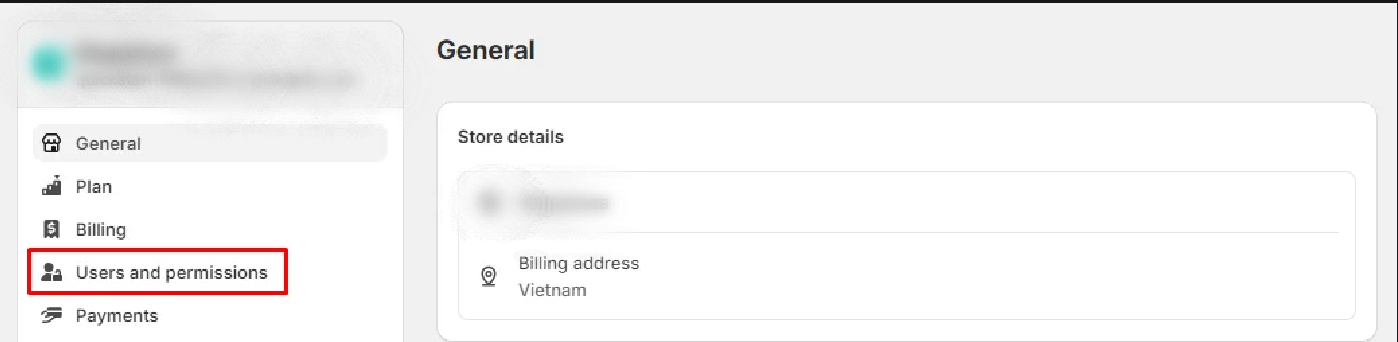
Step 1: From the Shopify admin page, navigate to Settings > User and permissions.
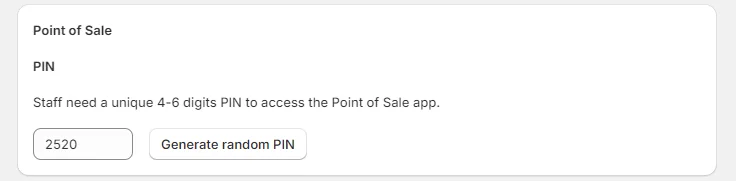
Step 2: Click on the name of the user whose PIN you want to check. Under Point of Sale, you can view and edit the PIN. Be sure to click Save after making any changes.
Managing POS PINs
Setting up and managing POS PINs on Shopify is essential for ensuring the security and efficiency of your store operations. Assigning a unique PIN to each employee makes it easier to monitor individual sales performance while enhancing security.
This feature is particularly beneficial for businesses with multiple employees due to its ease of management, efficiency, and security.
Security Measures for Shopify POS PIN
Here are some security measures and best practices for effectively managing POS PINs on Shopify:
- Regular PIN Changes: Change PINs periodically to minimize the risk of information exposure. Consider setting policies for monthly or quarterly changes based on your security needs.
- Access Management: Only grant POS PIN access to essential employees. Ensure each employee has a separate PIN for better tracking and control over individual activities.
- Use Shopify’s Security Features: Leverage Shopify’s security features, such as two-factor authentication (2FA) and activity reports, to enhance the security of your POS system.
- Ensure Software Updates: Keep your POS software updated to the latest version, as updates often include important security patches and performance improvements.
- Use Secure Connections: When accessing the POS system, always use a secure connection like HTTPS to protect data during transmission.
By following these security practices, you can ensure that your Shopify POS PINs are well protected, reduce the risk of compromise, and maintain stable operations for your business.






