
For stores with large catalogs, managing categories purely by name or SKU is inefficient. The **Admin Category Product Thumbnail** extension brings visual context into the admin UI by showing product thumbnails directly in the category product grid—making catalog management faster, clearer, and less error-prone.
Why Thumbnails in Admin Matter for Magento Stores
- Admins rarely remember SKUs or names; images help immediate recognition.
- Reduces mis-assignment of products to categories by visual confirmation.
- Saves time: fewer clicks to edit products just to verify which is which.
- Improves backend usability and reduces catalog mistakes.
Key Features of the Magento 2 Admin Category Product Thumbnail Extension
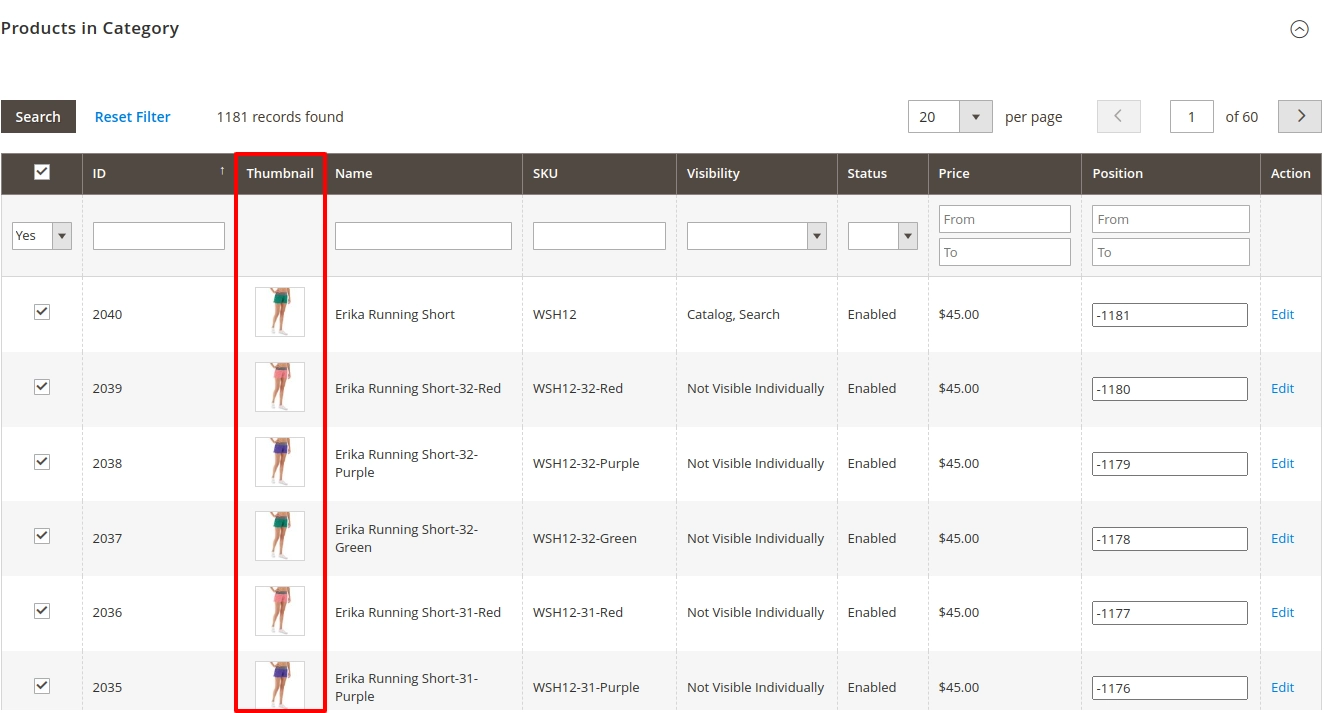
- Thumbnail in Category Grid: Shows product images directly in “Products in Category” tab in admin. :contentReference[oaicite:0]{index=0}
- Configurable Size & Layout: Adjust thumbnail dimensions or layout for readability.
- Performance Optimization: Lazy loading or caching to avoid admin slowdown even with large catalogs.
- Seamless Integration: Works alongside other admin grid customizations without conflict.
- Upgrade-Safe Design: Uses proper plugins or UI component overrides—not core overrides.
How It Works in Your Store Admin
- Install & Enable: Use composer or module installation; enable module and clear cache.
- Category → Products View: In admin, go to Catalog → Categories → “Products in Category” tab.
- Thumbnail Display: Next to each product row you'll see the thumbnail image cell.
- Customization: Admin may adjust size settings or enable/disable thumbnails via config.
Business Benefits You Gain
| Benefit | Impact |
|---|---|
| Faster Product Identification | Admins recognize products visually in the grid |
| Reduced Errors in Assignment | Fewer wrong category-product links |
| Operational Efficiency | Less need to jump into product detail just to confirm identity |
| Better UX for Admins | Backend feels more visual, less abstract |
Use Case Scenario
Suppose your “Apparel” category has 100 SKUs. Currently you see only names or SKUs and must click each to confirm which product it is. With thumbnails, you immediately see images next to names. Admin assigns or removes items quicker, with fewer mistakes.
Admin Grid Example:
Mavenbird empowers Magento 2 merchants with smarter admin UIs and productivity-focused extensions like **Admin Category Product Thumbnail**.
Want to see product images in your category grid?
Contact Us today and streamline your catalog management.
Contact Us today and streamline your catalog management.