
Operating an eCommerce store involves more than just launching an attractive website, adding a few products, and running ad campaigns to attract traffic. To achieve the best results, it's essential to optimize your website for Shopify sales and track your online store's conversion rate.
Even if you're putting in significant effort to enhance the customer experience, you might still find yourself puzzled as to why you're not seeing the desired results.
What is a “conversion rate”?
In simple terms, successful online store managers define conversion rate as the percentage of visitors who take the desired action. You calculate retail conversion rates by dividing the number of visitors who saw your page or message by the number of those who converted.
The ultimate aim is to encourage website visitors to make a purchase.
However, customers typically go through multiple conversion steps before completing a purchase, which can include:
- Adding an item to their cart
- Navigating to a product page
- Clicking on a promotional banner
- Clicking on an ad
- Starting a chat on your website
The most crucial online retail conversion rate to focus on is the ratio of visitors to those who made a purchase.
Ultimately, your goal as an eCommerce retailer is to drive as many sales as possible.
What’s a good conversion rate?
The average retail conversion rate worldwide, including platforms like Etsy, sits at a modest 2.86%. This means that out of 100 website visitors, only about 2.86 will make a purchase.
The harsh reality is that merely driving traffic to your store isn’t enough. You also need to optimize your website for conversions, ensuring that shoppers are encouraged to complete their purchases after browsing your products.
So, how can you improve your average conversion rate?
First, it’s essential to track the conversion events on your pages throughout your online store. From there, you can make adjustments to those pages to achieve the results you want and maximize your success.
How to measure your Shopify conversion rate on Google Analytics
Measuring your average Shopify conversion rate is crucial for optimizing your eCommerce efforts. Without a clear understanding of your store’s performance, you won’t be able to identify the areas that require improvement on your website.
The best tool we recommend for measuring your Shopify conversion rate is Google Analytics. It’s an excellent platform for tracking website traffic and providing valuable insights into visitor behavior.
First and foremost, Google Analytics is free for all businesses, and you don’t need a specialized version for eCommerce to get started. In addition to your Shopify conversion rate, the platform offers data on:
- Bounce rate
- Unique and returning visitors
- Website speed and performance
- Facebook product advertising results
- And more
Fortunately, measuring your Shopify store’s performance with Google Analytics is a straightforward process. Here’s how to start measuring your conversion rate in three simple steps:
- Go to the Google Analytics dashboard and click on “Conversions.”
- Select “Ecommerce” and navigate to “Overview.”
- From there, you’ll see a chart of your store’s performance over a specific period, along with your conversion rate displayed beneath the chart.
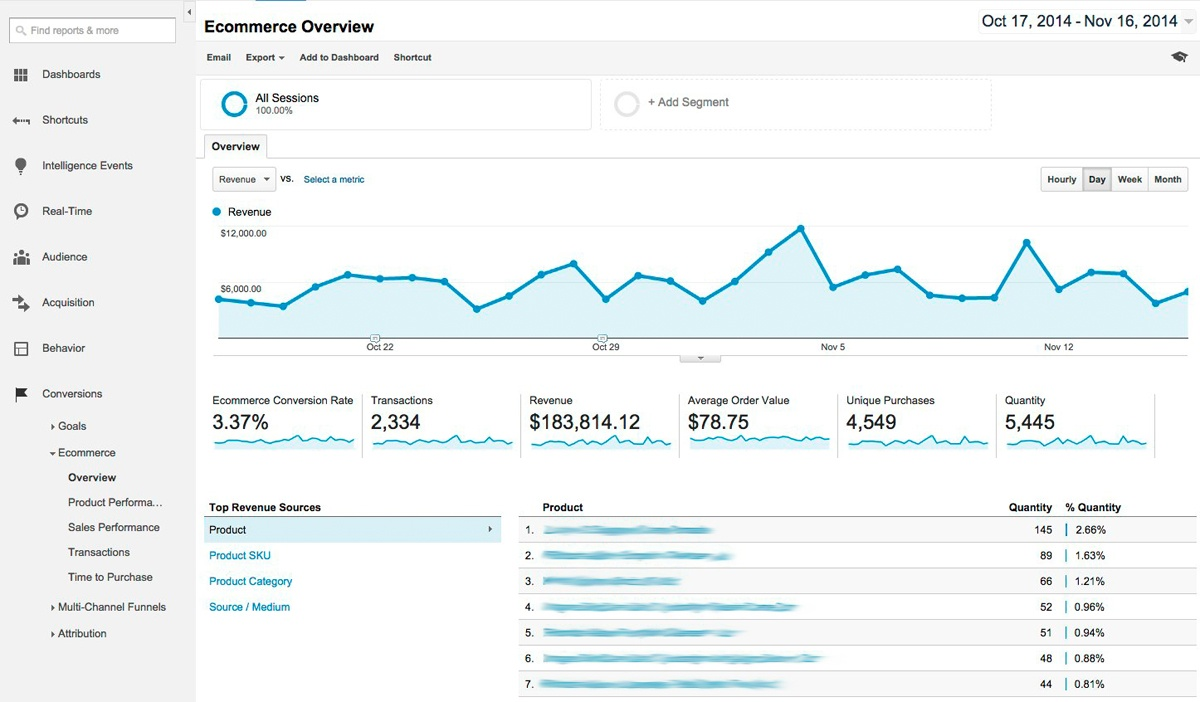
We recommend starting to use Google Analytics once you reach at least 500 monthly visitors. If you have surpassed this threshold, it’s beneficial to segment that traffic over a specific timeframe, such as the visitors from the previous month.
How to use Google Analytics to improve your conversion rate
Time Needed: 30 Minutes
According to Econsultancy, only 22% of retail store managers are satisfied with their average conversion rate. By identifying the factors that hinder your conversion rate, you can implement changes that lead to better results.
Here’s how to use Google Analytics as a roadmap to optimize your store:
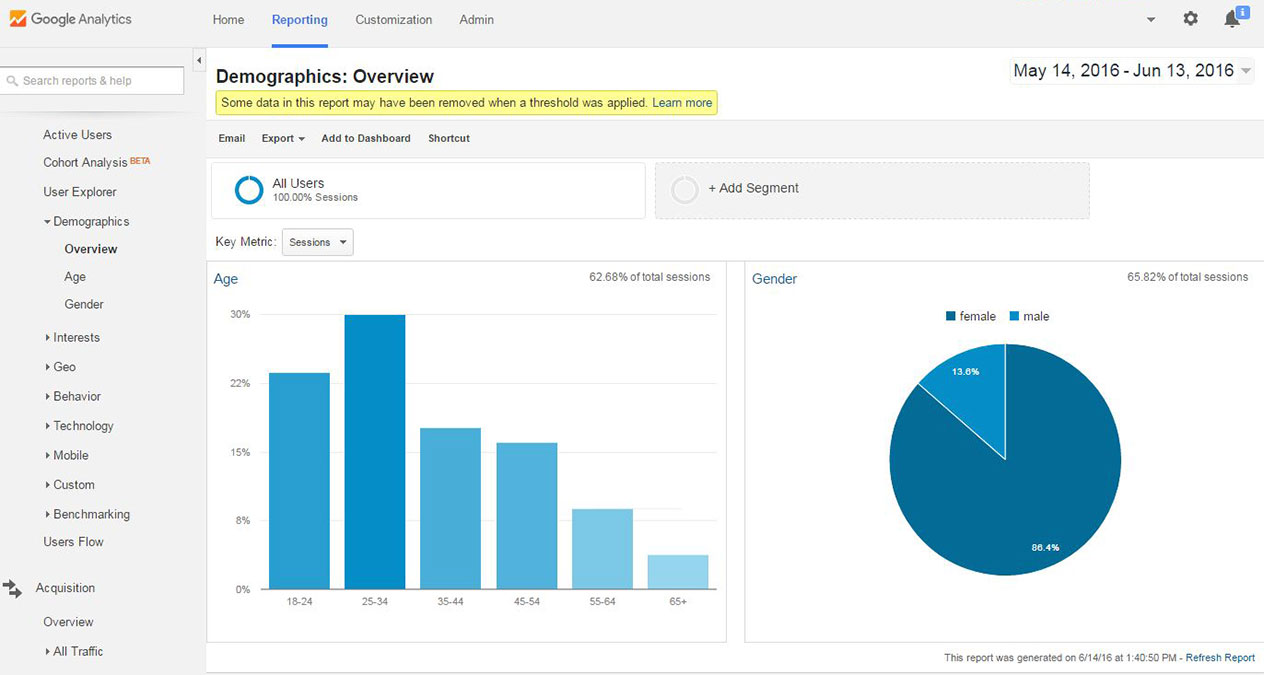
1.Dive Deep Into Your Demographics
Improving your conversion rate begins with understanding your audience. By reaching the right people with your products, you’re more likely to drive sales and boost traffic.
Google Analytics offers valuable insights into your customers, including their age, gender, location, and more. This information can help you enhance your marketing campaigns and tailor them to be more personalized.
To access this data, navigate to: Audience > Demographics > Overview.
Keep this data in mind the next time you launch a marketing campaign for your store, allowing you to effectively target the right audience and make your campaigns more relevant.
2.Measure Each of Your Product’s Performance
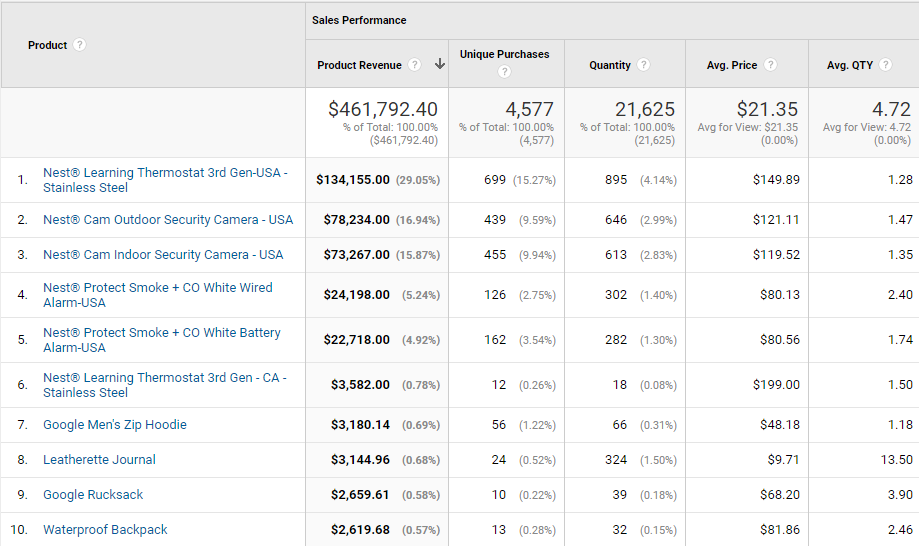
Next, you can't improve your conversion rate without understanding which products are performing well and which are not.
Google Analytics enables you to quickly identify your best-selling products with just a few clicks. To access this information, navigate to: Conversions > Ecommerce > Product Performance.
By pinpointing your top products, you can enhance your sales strategy by promoting them on your homepage, allowing first-time visitors to discover them right away.
3.Determine Your Best Acquisition Channels
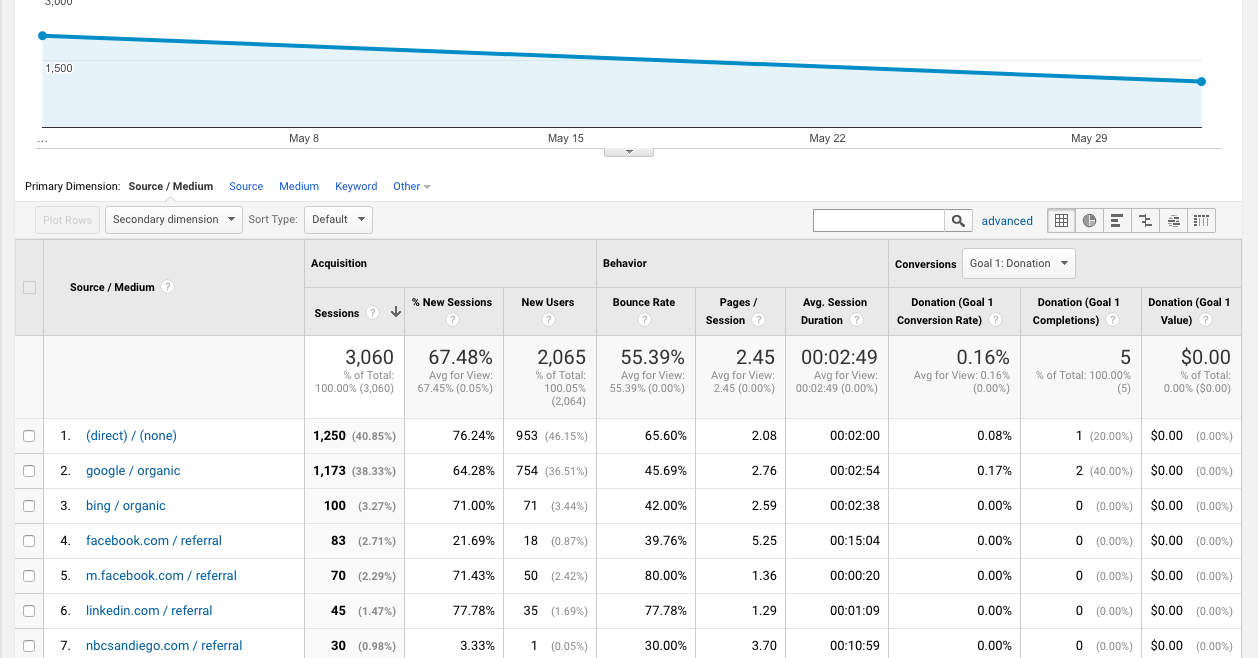
Do you know where most of your visitor traffic is coming from? Is it from social media, email, advertising, or referrals?
If you’re unsure, Google Analytics can help you identify your highest-converting channels, allowing you to focus your efforts where they matter most.
Simply navigate to: Acquisition > All Traffic > Channels.
After analyzing this data, you can allocate more budget to the channels that generate the most revenue. Conversely, if you find a channel that is underperforming, you can explore ways to improve it and enhance conversions.
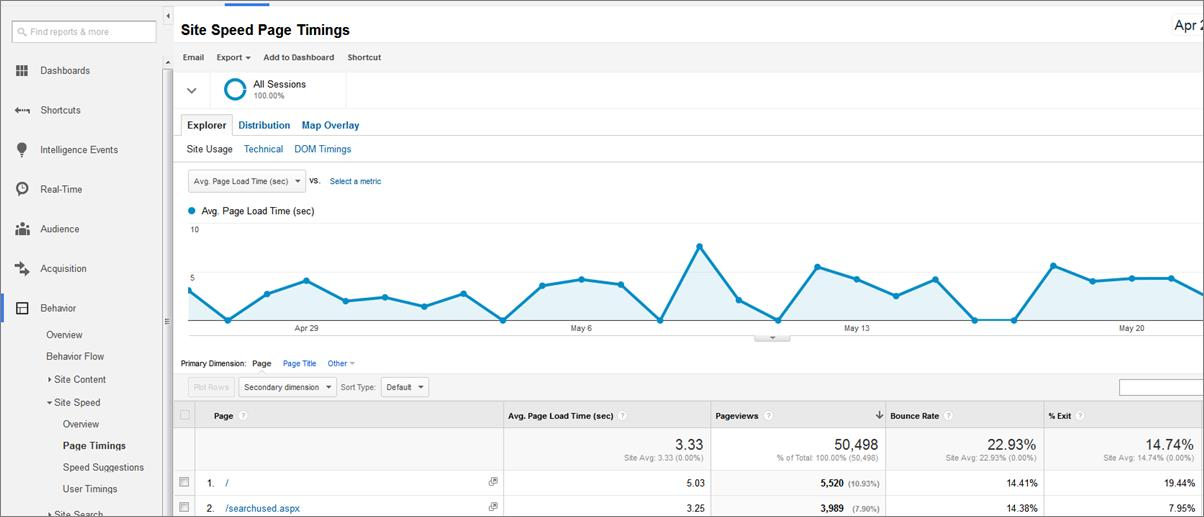
4.Identify Pages That Load too Slow
A slow-loading Shopify store can significantly harm your conversion rate. In fact, 53% of website visitors will abandon a site if it takes more than 3 seconds to load.
It doesn’t matter if you have the best product in the world; if your website is slow, customers will leave without making a purchase.
Fortunately, Google Analytics helps you identify which pages are loading the slowest. To access this information, navigate to: Behavior > Site Speed > Page Timings.
By improving your website’s speed, you'll reduce the likelihood of visitors bouncing off your page, leading to a natural increase in your conversion rate.
Get the most out of Google Analytics with automation
While Google Analytics is an excellent tool for measuring your performance, you don't have to stop there. You can enhance your efforts through automation.
An automation platform like Mavenbird helps you define Shopify workflows for repeatable tasks. Designed specifically for eCommerce stores, it allows you to maximize the capabilities of Google Analytics. You can automate workflows to gain deep insights into your store’s performance and make improvements for better results.
One limitation of Google Analytics is its inability to track order returns. Mavenbird addresses this by enabling you to automate workflows that monitor which products result in the most refunds. This way, you can remove those items from your store and prevent returns from negatively impacting your conversions.
Tips to boost your conversion rate on Shopify
We recommend measuring your Shopify store’s performance at least once a week to track its growth over time.
In the meantime, small changes to your website can lead to significant improvements in conversion rates.
Here are some of the best strategies to enhance your Shopify store’s conversion rate:
Optimize Your Shopify store for Mobile
An increasing number of people are using their mobile devices to make purchases. By 2021, mobile sales accounted for approximately 54% of total eCommerce revenue.
If your website isn’t optimized for mobile, you’re missing out on significant opportunities. It's essential to ensure that your site is responsive and visually appealing on all devices, allowing customers to make their purchases with ease.
Send Cart Abandonment Emails
Cart abandonment can be frustrating, but it doesn't have to signify the end of a sale. Often, a simple follow-up email is all it takes to boost conversions and win customers back.
Here’s a great example of a cart abandonment email from Jack Wills:
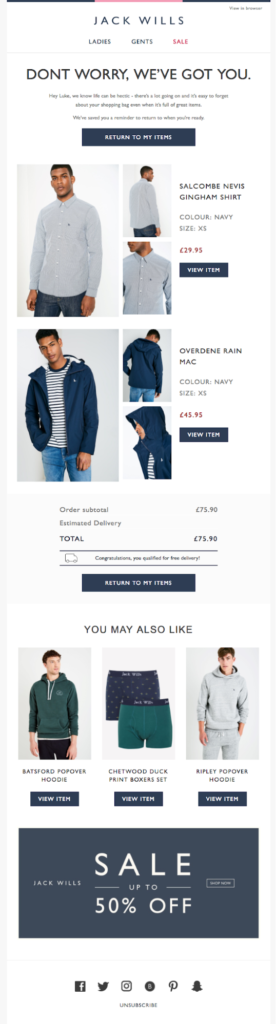
In this example, they provide the customer with a second chance to complete their purchase. Additionally, they include other product recommendations in case the item in the cart wasn't quite right.
There are several tools available on Shopify that can help you send automated cart abandonment emails. Be sure to check out our guide on reducing abandoned carts for more tips and strategies.
Improve Your Checkout Page
The checkout page is a crucial touchpoint in the customer journey. It’s the final step a visitor takes before becoming a paying customer.
Optimizing the checkout page is essential for improving your conversion rate. You should aim to eliminate any friction, ensuring that customers can complete their purchases effortlessly.
Moreover, offering a variety of payment methods can enhance the checkout experience. By providing more options, customers are more likely to find a payment service that suits their preferences.
Use High-Quality Product Images
It may seem obvious, but high-quality images are essential for your product pages. According to two-thirds of customers, quality images significantly influence their purchasing decisions.
Start by including multiple product images that showcase your item from different angles, giving customers a comprehensive view. We recommend hiring a professional photographer to achieve the best results.
To elevate your product pages even further, consider adding product videos, similar to what top eCommerce brands like Asos regularly incorporate into their descriptions:

Video production can be challenging but there is a Shopify video app that aims to make that significantly easier for merchants.
Leverage Positive Reviews and Testimonials
Clearly, social proof is a significant driver of conversions: 90% of customers rely on reviews from others during their purchasing process. You can enhance your product pages by including customer reviews and testimonials, just like The North Face does:
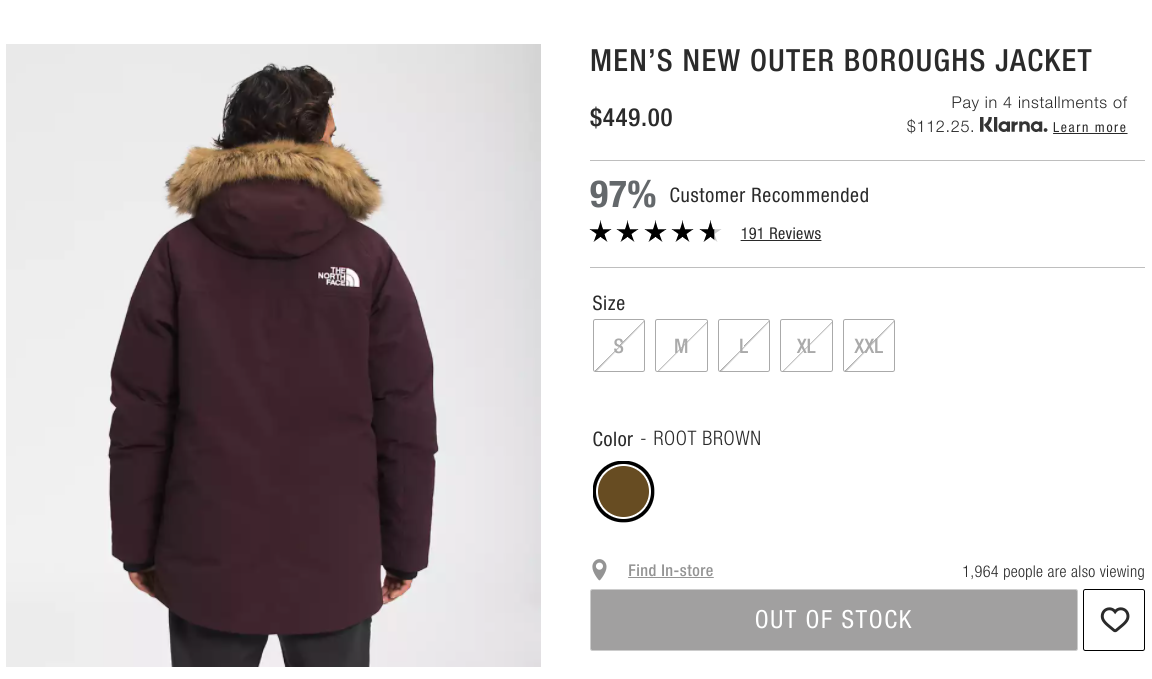
To elevate your strategy even further, consider incorporating user-generated content from your own customers to showcase your products. After all, who better to promote your products than satisfied customers themselves?
Wrapping Things Up
In summary, improving your conversion rate doesn't have to be complicated. By utilizing Google Analytics, you can pinpoint blind spots on your website that hinder conversions and enhance your marketing workflows. This will ultimately help you generate more sales and attract higher-quality traffic.