
In this topic, I will introduce how to configure the default CMS page. The default page is a page which will be appeared when you click on base URL. Often the home page is configured as the default page. Also, when a “Page Not Found” error occurs, the default page will be shown.
Configure the default pages in Magento 2
Follow the simple guide to Configure the Default Pages in Magento 2:
- On the Admin panel, click Stores. In the Settings section, select Configuration.
- Select Web under General in the panel on the left
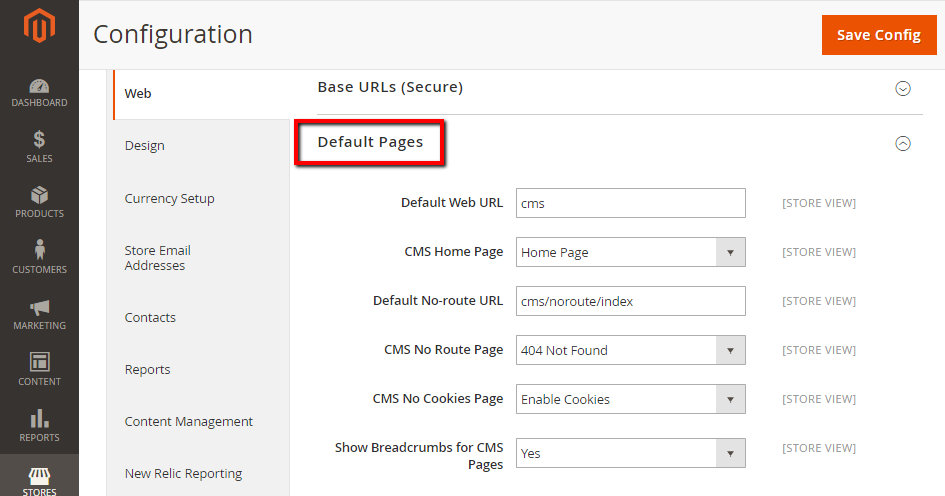
- Open the Default Pages section, and continue with following:
- In the Default Web URL field, the default value cms or enter other value as needed
- In the CMS Home Page field, select the page you want to become your home page, you should select “Home Page”
- In the Default No-route URL field, the default value is “cms/index/noRoute.” or enter other value as needed
- In the CMS No Route Page field, select 404 Page Not Found value to show CMS page when a 404 Not Found error appears
- In the CMS No Cookies Page field, select Enable Cookies value to show CMS Page when cookies are disabled in the browser
- In the Show Breadcrumbs for CMS Pages field, set Yes if you want to show a breadcrumb trail at the top of all CMS pages
- When complete, click Save Config.
62% stores have vulnerability and 14% stores have 4+ security issues,learn more.
The bottom line
This is a quick guide on how to set the default page in Magento 2. This configuration is necessary for the display of the base URL, and also in case there is a 404 Not Found error. If you need help with this, don’t hesitate to leave a comment.